Patch-Clamping Drosophila Brain Neurons
- 1Instituto de Investigación en Biomedicina de Buenos Aires (IBioBA-CONICET), Partner Institute of the Max Planck Society, Buenos Aires C1425FQD, Argentina
- ↵2Correspondence: nmuraro{at}ibioba-mpsp-conicet.gov.ar
Abstract
Drosophila melanogaster is widely used as a model organism in all fields of biomedical research. In neuroscience, vast amounts of information have been gained using this little fly including the identification of neuronal circuits that regulate behaviors, the unraveling of their genetic underpinnings, and the molecular mechanisms involved. With plenty of genetic tools available to manipulate and infer neuronal activity, the direct measurement of electrical properties of fly neurons has lagged behind. This is due to the intricacies of performing electrical recordings in small cells such as fly central neurons. The patch-clamp technique offers the unique possibility of directly measuring the electrical properties of Drosophila neurons. This step-by-step protocol provides detailed advice for mastering this technique.
MATERIALS
Reagents
Dissected Drosophila brains from Protocol: Dissection of Drosophila Wandering Larval Brains for Patch-Clamping Neurons (Fernandez-Chiappe and Muraro 2022a) or Protocol: Dissection of Drosophila Adult Brains for Patch-Clamping Neurons (Fernandez-Chiappe and Muraro 2022b)
Drugs (optional; see Step 1)
External saline solution for the appropriate stage (select one):
-
External saline solutions can be prepared in advance if sucrose, glucose, and calcium chloride are omitted (add before use).
Internal saline solution for the appropriate stage (select one):
Mineral oil or H2O (optional; see Step 1)
Equipment
Clampex software
Dissection microscope (e.g., Leica S6E; optional, see Step 1)
Electrophysiology setup including an upright compound microscope (e.g., Olympus BX51WI) with 10× air and 60× long-distance H2O-immersion objectives and LED light sources with the right filters to detect the desired fluorophore, an amplifier (e.g., Axopatch 200B or MultiClamp 700B [Axon Instruments]), a digitizer (e.g., Digidata 1550b [Axon Instruments]), a PC with software to acquire and analyze electrophysiology data (e.g., pCLAMP [Molecular Devices]), ground wire, a recording chamber, and a perfusion system if required by the experiment (see Step 1)
Forceps (optional; see Step 1)
Microcentrifuge tubes (0.5-mL)
MicroFil needles (28G, flexible; e.g., World Precision Instruments MF28G67-5) or homemade pipette-filling devices (see Step 14)
-
See Steps 14–19 of Protocol: Preparation of Pipettes and Pipette-Filling Devices for Patch-Clamping Drosophila Neurons (Fernandez-Chiappe and Muraro 2022c) for how to prepare homemade pipette-filling devices.
Microscope slides (75-mm × 25-mm; optional, see Step 1)
Model cell (Axon Instruments)
MultiClamp Commander software
Pasteur pipettes
Patch pipettes
-
Prior to the experiment, pull and polish patch pipettes by following Steps 1–13 of Protocol: Preparation of Pipettes and Pipette-Filling Devices for Patch-Clamping Drosophila Neurons (Fernandez-Chiappe and Muraro 2022c).
Pipette holder (e.g., Molecular Devices 1-HL-U)
-
The silver wire that protrudes from the holder needs to be covered in silver chloride to efficiently conduct current. To chlorinate silver wires, see Box 1.
Pipette tips (1-mL, blue)
Plastic tubing (fine, flexible; e.g., Tygon T3601-13)
Stopcock (three-way) and connectors
Syringe filters (pore size, 0.2-µm; e.g., Nalgene)
Syringes (1-mL and 10-mL)
Wax or Blu Tack (see Step 2)
METHOD
Protease Treatment for Removal of Superficial Glia
-
1. Set up the electrophysiology experiment as required.
-
If the experiment requires pharmacological agents to be applied and washed off, equip the setup with a recording chamber connected to a perfusion system.
-
Perfusion chambers usually have a glass-bottom surface, which is ideal, as the thin glass coverslip on which the brain is glued will naturally attach to it if gently pressed with forceps underneath the chamber filled with external saline (adult or larval as appropriate).
-
-
If perfusion is not essential for the experiment and the setup does not have an attached perfusion system, add a drop of mineral oil or H2O to a microscope slide so that it sticks to the microscope slide but is still movable if required. Next, mount the coverslip containing the glued-down brain on top of the microscope slide.
-
If this is the case after the dissection but still under the dissection microscope, wash the preparation by exchanging the external saline (adult or larval as appropriate) with fresh solution two or three times (to remove pieces of glue and other debris). Use a Pasteur pipette to aspirate the saline, adding fresh solution with another Pasteur pipette simultaneously. Leave a droplet of external saline on top of the preparation that is large enough so that it is possible to insert the ground wire underneath the drop without touching the preparation with the ground wire and without interfering with access of the recording pipette to the brain.
See Troubleshooting.
-
-
-
2. Insert the ground wire into the recording chamber and immobilize it with wax or Blu Tack.
-
Ensure that the wire stays in place when moving or turning the headstage. Be careful not to touch the preparation while doing this.
-
-
3. Position the brain under the microscope as follows.
-
i. Focus on the brain with a low-magnification air objective (10×).
-
ii. Position the brain in the middle of the field of view.
-
iii. Switch to the higher-magnification (such as 60× or 63×) H2O-immersion objective, and confirm that the desired part of the brain is in the center of the field of view (the ventral nerve cord [VNC] for Protocol: Dissection of Drosophila Wandering Larval Brains for Patch-Clamping Neurons [Fernandez-Chiappe and Muraro 2022a] and the accessory medulla for Protocol: Dissection of Drosophila Adult Brains for Patch-Clamping Neurons [Fernandez-Chiappe and Muraro 2022b]).
-
iv. Confirm that no damage has been caused to the brain during the dissection and switch back to the 10× objective.
-
To switch objectives, always move the objective up and away from the preparation before turning or swinging (depending on the microscope system) to the other objective.
-
-
-
4. Insert a pipette filled with protease solution (also referred to as a protease pipette) into the pipette holder. Carefully position the tip of the pipette on top of and close to, but not touching, the part of the brain where the glial sheath needs to be removed.
-
This would be a medial part of the VNC for the larval dissection (Protocol: Dissection of Drosophila Wandering Larval Brains for Patch-Clamping Neurons [Fernandez-Chiappe and Muraro 2022a]) and the accessory medulla area for the adult preparation (Protocol: Dissection of Drosophila Adult Brains for Patch-Clamping Neurons [Fernandez-Chiappe and Muraro 2022b]).
-
-
5. Switch to the higher-magnification H2O-immersion objective. Focus on the tip of the pipette.
-
6. Move the focal plane down, and then lower the pipette until the tip is in focus.
-
7. Repeat Step 6 until the tip is closer to the brain, and then change the manipulator to a slower velocity to have better control of your movements. As you approach the brain with the pipette, reposition the tip so that, when going down, it will eventually land on the small area where the protease solution needs to be applied. Move the pipette down until the tip is in contact with the surface of the brain.
-
For the larval preparation, this would be close to the midline, a little toward the side where the pipette is coming from. aCC/RP2 motor neurons are fairly distinguishable by their position; however, until the experimenter's eye is trained to recognize them, use the RN2-Gal4 (eve-Gal4) driver to drive upstream activation sequence (UAS)-green fluorescent protein (GFP)/red fluorescent protein (RFP) expression. Once trained, genetic labeling of the neurons becomes unnecessary. However, to be sure that the correct motor neuron is recorded, a fluorescent dye may be included in the internal saline to allow distinction of the neurons by their characteristic projections (see Step 33). For preparation of adult flies, at this point, turn on the LED that allows visualization of the fluorescently labeled lateral ventral neurons (LNvs) to guide the tip of the pipette with protease solution to the area where the somas are located.
-
-
8. Prepare a pressure-application device.
-
i. Connect a 1-mL tip to a section of Tygon tubing.
-
ii. Connect the pressure-application device to a three-way stopcock and from there, with another section of Tygon tubing, to the lateral suction tubing of the pipette holder.
-
iii. Connect a 10-mL syringe to the three-way stopcock.
-
iv. Move the lever of the three-way stopcock to connect the pressure-application device or the syringe or close it to hold pressure, according to the requirements of each step.
-
-
9. Remove the glial sheath by gently massaging with positive and negative pressure applied from the pressure-application device (alternating between positive and negative pressure).
-
The glial sheath of the brain is quite tough and will probably not open on the first attempt. Move the pipette with protease solution locally within a small area of the chosen site treated with protease solution (a VNC hemisegment for Protocol: Dissection of Drosophila Wandering Larval Brains for Patch-Clamping Neurons [Fernandez-Chiappe and Muraro 2022a] or a site at the accessory medulla close to the position of the somas of LNvs for Protocol: Dissection of Drosophila Adult Brains for Patch-Clamping Neurons [Fernandez-Chiappe and Muraro 2022b]), and continue massaging using the pressure-application device until a small turbulence in the tissue is seen, which indicates that the glial sheath is now opened.
-
See Troubleshooting.
-
-
10. Clean the area by aspirating the shredded pieces of glial sheath that are loosely attached to the surface of the brain.
-
Nicely exposed (with a round and clean appearance) neuronal somas should be visible (Fig. 1A). If they are not, keep applying protease solution to the area to widen the glial sheath opening. At this point, be cautious when applying negative pressure, as the pipette will be very close to your target neurons. Take into account the fact that the protease pipette tip is fairly large; be careful not to suction off the chosen cell somas.
-
-
11. Retract the pipette with protease solution away from the preparation, and remove the pipette with protease solution from the pipette holder.
-
If a perfusion system is available, wash the preparation by perfusing fresh external saline (adult or larval as appropriate) into the preparation while you prepare the setup for the next steps.
-
-
12. If fluid accumulates in the tubing, push air through the line using the 10-mL syringe connected to the three-way stopcock. Collect the fluid with a tissue positioned on the open end of the pipette holder.
-
Fluid buildup will impair further attempts to apply pressure; therefore, it is important to remove any accumulated fluid as needed and particularly at the end of a patching session.
-
See Troubleshooting.
-
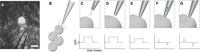
(A) Photograph of the accessory medulla area of an adult Drosophila brain magnified 60× showing exposed neuronal somas, including an lLNv marked with fluorescence. The protease pipette used for glial removal is shown nearby for comparison of scale. Scale bar, 10 µm. (B) Schematic of a patch pipette beside four large lateral ventral neurons (lLNvs). (C–G) Step-by-step schematic of patch pipette positions needed to achieve whole-cell configuration (top panels) and the corresponding signals in Clampex (bottom panels). (C) (Top) As the pipette approaches the target cell, a small amount of positive pressure needs to be applied (red arrow) to prevent debris from adhering to the tip of the pipette. (C) (Bottom) A current square step (seal test) should appear in Clampex. (D) (Top) Once the pipette is close enough, positive pressure should be stopped. (D) (Bottom) The current square step from C should show no change. (E) (Top) The pipette touches the cell, making a little depression that is visible under the microscope. (E) (Bottom) The square current step begins to flatten, as touching the cell produces an increase in resistance. (F) (Top) Negative pressure (blue arrow) is applied through the patch pipette to achieve the giga-seal. (F) (Bottom) When the giga-seal is achieved, the square current step becomes a flat line, with two very narrow capacitive transients. (G) (Top) After applying sharp negative pressure, the cell opens and whole-cell patch-clamp configuration is achieved. (G) (Bottom) Once the cell has opened into whole-cell configuration, the capacitive transients from F (bottom) widen.
Patch Clamping
-
13. Change to the lower-magnification objective.
-
14. Load a fire-polished patch pipette with internal saline with (Steps 14.iii–14.vii) or without (Steps 14.i–14.ii) fluorescent dye.
Loading without Fluorescent Dye-
i. Fill a 1-mL syringe with internal saline, attach a 0.2-μm filter to the syringe, and then attach a MicroFil flexible needle (or a homemade equivalent; see Steps 14–19 in Protocol: Preparation of Pipettes and Pipette-Filling Devices for Patch-Clamping DrosophilaNeurons [Fernandez-Chiappe and Muraro 2022c]) to the filter.
-
Use the filter to avoid clogging the pipette with particles from the solution.
-
-
ii. Insert the MicroFil into the pipette all the way to the tip to maximize contact of the solution with the silver wire, and press the syringe to fill the patch pipette completely; do this gently to avoid bubble formation.
-
iii. Visually inspect the pipette tip for bubbles. If present, tap the pipette gently with your finger, holding it vertically (tip down) to release the bubbles.
-
iv. Insert the patch pipette filled with internal solution into the pipette holder.
-
i. To load the dye into the tip of the pipette, prepare dye diluted in internal saline in a small microcentrifuge tube and insert a patch pipette (tip up).
-
The fluorescent dye is used to recognize aCC/RP2 motoneurons without genetically labeling them. The dye will fill a small volume in the tip, ascending by capillarity because the glass used to pull the pipettes contains a filament inside that allows this to occur (the dye takes only minutes to ascend and will be visible as a small colored volume in the tip).
-
-
ii. Fill a 1-mL syringe with internal saline, attach a 0.2-μm filter to the syringe, and then attach a MicroFil flexible needle (or a homemade equivalent; see Steps 14–19 in Protocol: Preparation of Pipettes and Pipette-Filling Devices for Patch-Clamping Drosophila Neurons [Fernandez-Chiappe and Muraro 2022c]) to the filter.
-
Use the filter to avoid clogging the pipette with particles from the solution.
-
-
iii. Insert the MicroFil into the pipette all the way to the tip to maximize contact of the solution with the silver wire, and press the syringe to fill the patch pipette completely; do this gently to avoid bubble formation.
-
iv. Visually inspect the pipette tip for bubbles. If present, tap the pipette gently with your finger, holding it vertically (tip down) to release the bubbles.
-
v. Insert the patch pipette filled with internal solution into the pipette holder.
-
-
15. Confirm on the amplifier (or amplifier software) that you are in voltage-clamp mode.
-
16. Lower the pipette into the external saline (adult or larval as appropriate, at room temperature) bath, and, as soon as it touches the liquid, test the resistance of the pipette using the Membrane Test tool of Clampex. Locate the square step in the Clampex screen (Fig. 1C, bottom panel), click “offset pipette” to zero, and change the scale to see it properly if necessary. Confirm that pipette resistance is in the range of 9–12 MΩ. If pipette resistance is not appropriate, obtain a new pipette and retest.
-
See Troubleshooting.
-
-
17. Carefully position the tip of the pipette on top of and close to the area where the target neuron is, but without touching it (Fig. 1B).
-
18. Switch to the higher-magnification H2O-immersion objective. Focus on the tip of the pipette.
-
19. Move the focal plane down, and then lower the pipette.
-
20. Repeat Step 19 until the tip of the pipette is near (but not touching) the exposed neuron somas. Once you are close, change the manipulator to a slower velocity to have more control of your movements.
-
21. (Optional) If the target neuron is fluorescently labeled, turn on the LED briefly to identify the cell that you wish to patch.
-
If cells in the larval preparation are not fluorescently labeled, you can guess their position in the ventral nerve cord taking into account the relative position of their soma. Cells in the adult preparation must be genetically labeled as they are immersed in a sea of neurons that look very similar.
-
-
22. (Optional) If the LED was turned on in Step 21, turn it off.
-
Good differential interference contrast is necessary to see the pipette making contact with the cell, and fluorescent light does not allow proper visualization of the membrane.
-
-
23. As you approach the cell that you have chosen to patch, gently apply positive pressure to avoid floating debris adhering to the tip of your patch pipette (Fig. 1C, top panel). Continue applying positive pressure until Step 26.
-
If the tip of the patch pipette touches anything before the chosen neuron, obtain a new pipette. Do not try to cut corners here; a high-resistance seal will not form between the membrane and the pipette if the glass has already touched tissue. If it has, obtain a fresh pipette and start from Step 13 again.
-
-
24. Re-zero your pipette again, even if you have offset it before.
-
By now, the baseline has probably drifted slightly.
-
See Troubleshooting.
-
-
25. As you approach the chosen cell, reposition the tip so that it comes from the side.
-
Try to keep the tip of the pipette and the cell on the same focal plane.
-
-
26. Stop applying positive pressure with the pipette (Fig. 1D). Slowly advance the pipette toward the cell, and, as you touch the cell (you should see the tip of the pipette making a little depression on the cell's surface; Fig. 1E, top panel), apply negative pressure in a sustained but very gentle manner to achieve the giga-seal (Fig. 1F, top panel).
-
Proceed to Step 27 if the square current step on your computer screen becomes a flat line, with two very narrow capacitive transients, indicating good cell attachment (Fig. 1F, bottom panel).
-
If the square current step on your computer screen becomes a line that is not completely flat, you have not achieved good cell attachment; you can apply a little more negative pressure or you can wait 30 sec and try again. If the cell does not seal properly after two or three attempts, there is no chance of getting a good cell opening. Remove the pipette and repeat the procedure from Step 13 on another cell.
-
Remember, patch pipettes can only be used once, and you can only attempt to record cells once.
See Troubleshooting.
-
-
-
27. Set the holding command to −60 mV.
-
If the seal is good, the line should not move down when you do this.
-
-
28. Open the patch to go into whole-cell patch-clamp configuration; do this with sharp (but not too strong) suction or a combination of suction and zapping. Start low (with both the suction and the zapping) and increase until the cell becomes open. To zap:
-
If you have buttons on your amplifier, use them to apply a voltage pulse.
-
If you do not have buttons on your amplifier, use the MultiClamp Commander to apply a voltage pulse.
-
When performing these attempts to open the cell, look at the computer screen. The cell has opened into whole-cell configuration when the capacitive transients widen (Fig. 1G, bottom panel). While attempting to open a cell, you may lose the seal (it happens very frequently; do not worry). If this occurs, remove the pipette and repeat the procedure starting from Step 13 on another cell.
Play with a model cell (a circuit that mimics patching a cell) before the patching session to better understand what should occur on the computer screen when a neuron opens into whole-cell configuration. See Troubleshooting for Step 16 to learn more about how to use a model cell.
If you opened a cell, that is awesome—you made it!
-
-
-
29. Check the holding current (the amount of current that needs to be injected to maintain the cell at −60 mV): The smaller the holding current, the better your seal is.
-
i. Check more parameters with the Membrane Test tool of Clampex software: the cell's capacitance Cm, the membrane resistance Rm, and the access resistance Ra.
-
ii. Save these values to compare with those of other recorded cells and, importantly, with those of the same cell at the end of the recording session.
-
This indicates how well the seal has persisted or whether the neuron has become leaky and the recording has become less reliable.
The holding current should be <30 pA. If the seal is not good, the amplifier injects more current to hold the voltage, as some of this current will leak out of the cell; this is why having a low holding current correlates with a good seal.
-
-
-
30. If your seal is good, there are many options for different procedures (see Discussion).
-
Open a gap-free voltage-clamp Clampex program and check whether you can see the typical rhythmic synaptic currents that motoneurons receive from cholinergic interneurons; they appear as downward spontaneous deflections (for larval preparation, see Protocol: Dissection of Drosophila Wandering Larval Brains for Patch-Clamping Neurons [Fernandez-Chiappe and Muraro 2022a]).
-
Go into current-clamp mode and open a gap-free current-clamp program. Assess the resting membrane potential of your cell and the spontaneous voltage activity.
-
In the lLNv preparation (see Protocol: Dissection of Drosophila Adult Brains for Patch-Clamping Neurons [Fernandez-Chiappe and Muraro 2022b]), you will see spontaneous burst firing if you completed the recording quickly enough, or tonic firing if the time from dissection to recording took longer (Muraro and Ceriani 2015).
See Troubleshooting.
-
-
-
31. Record the time of all successful recordings.
-
This is particularly important for lLNv recordings, not only to calculate the time from dissection to recording, which affects their firing mode as mentioned in Step 2 of Protocol: Dissection of Drosophila Adult Brains for Patch-Clamping Neurons (Fernandez-Chiappe and Muraro 2022b), but also because lLNvs are clock neurons; therefore, their activity changes at different times of the day. This is not strictly necessary for larval motoneurons.
-
-
32. Run all necessary procedures (see Discussion). Recheck the health of the cell and the seal (see Step 29); this will help to interpret results later. Stop the recording.
-
33. Switch on the LED light source to confirm the recorded neuron identity (genetically labeled or labeled with a fluorescent patch pipette dye).
-
34. Retract and remove the pipette, and then push air through the line to remove any fluid that may have accumulated in the tubing as described in Step 12.
-
35. One piece of advice: persevere! This is the only way with patch clamping. Now, take a break, have coffee/tea/H2O, and make another attempt. Just be careful with your caffeine consumption, as it can make some people “shaky,” and that can interfere with your dissection abilities!
TROUBLESHOOTING
Problem (Step 1): The preparation moves when gently pressed with forceps in the perfusion chamber.
Solution: If air is trapped between the coverslip and the glass of the chamber, the preparation will move, making patching impossible. Ensure that all air is released when pressing down on the coverslip.
Problem (Step 9): The pipette with protease solution becomes blocked.
Solution: If this happens, exchange the protease pipette for a new one and continue with the protease treatment in the same area.
Problem (Steps 9 and 12): Applying positive or negative pressure does nothing to the preparation.
Solution: For this protocol, it is crucial to keep a pressure-tight line. If applying positive or negative pressure does nothing to the preparation, there is either a pressure leak in the line or the line is full of fluid, preventing pressure action. First, remove the accumulated fluid as described in Step 12. If that does not help, prepare a sealed pipette by overpolishing and always keep it at hand in your setup, separated from the patch and protease pipettes. Test for pressure leaks using the sealed pipette by inserting it into the pipette holder and tightening. Change the lever of the three-way stopcock to connect only the 10-mL syringe. Connect the syringe with the embolus pushed in tightly. Pull from the syringe embolus. If the embolus does not quickly retract back to its original position when pulling from it, then there is a pressure leak in the line. The pressure leak may be in the connection from the Tygon tubing to the lateral suction tubing on the pipette holder. To correct this, remove the Tygon tubing from the holder, cut the tip of the Tygon tubing, and reconnect. A strip of Parafilm around this connection may help to prevent leaks in the future. Another source of pressure leakage may be the top of the pipette holder, from the part that connects to the headstage. To make the top of the pipette holder pressure-tight, place a small piece of stretched Teflon tape underneath the golden metal stub that connects to the silver wire, make a little hole for the stub, and close the connection with the Teflon tape in between. Finally, check the pipette holder for cracks; they do not last forever, and, after some time and action, the pipette holder may need to be exchanged for a new one.
Problem (Step 16): The line has become an antenna and the baseline moves every time the tubing is moved.
Solution: Cleaning any accumulating fluid from the tubing is important not only for pressure action to be possible (see above), but also because salts from the fluid may accumulate in the tubing and, even if you do clean it by pushing air through it often, they will eventually accumulate and create an antenna. Remove the tubing and clean it with distilled H2O or use new tubing to solve this problem.
Problem (Step 16): You cannot see the test voltage step.
Solution: Occasionally, there will be communication problems between the parts of your setup. To test where the problem is (e.g., whether it is a software problem or whether the silver wire requires recoating with silver chloride [see below]), first use the PATCH-1U model cell that came with your amplifier. A model cell is a circuit that mimics a patch-clamped neuron. To use the model cell, remove the pipette holder, unplug the earth wire from the back of the headstage, and plug the model cell into where the pipette holder was. Close the circuit using the connector wire going from the model cell to the back of the headstage, where the earth wire was connected. The model cell has three positions that you can switch while using a seal test program in Clampex. You should be able to see a step recording that mimics a pipette inserted into the bath solution in the position BATH, a flat line with narrow capacitive transients imitating a cell attached in the position PATCH, and the widening of the capacitive transients, indicating a whole cell in the position CELL. If the model cell shows all these recordings, the software is working; therefore, the problem is probably either located on the connections inside the pipette holder or is due to poor chlorination of the silver wire. Remove the silver wire and recoat it with silver chloride (see Box 1). After using the model cell, do not forget to replug the earth wire into the back of the headstage!
Problem (Step 24): There is too much noise in signal and/or baseline drifts.
Solution: If you are picking up too much noise and/or your baseline drifts out of the screen repeatedly, it is time to recoat the silver wire with silver chloride. To do this, follow the instructions in Box 1.
Problem (Step 26): The cell does not attach or does not open into whole-cell configuration.
Solution: A common problem is air leakage somewhere in the line; for pressure (both positive and negative) to be effective, the line should be airtight. To check whether your line is airtight, produce a sealed pipette by overpolishing, effectively closing the tip, and keep it at hand. When you need to check whether the line is airtight, place the sealed pipette in the pipette holder and, connecting the line only to the syringe, produce vacuum by pulling from the syringe embolus as described above.
Problem (Step 30): The neuron shows no electrical activity.
Solution: If you repeatedly obtain cells that are properly patch-clamped (good seal and good resting membrane potential) but show no electrical activity (spontaneous or induced by positive current injection), it may be that components of the glue are affecting the electrical activity of the neuron. This does not happen often, but we mention it because it has happened. Change the batch of glue that you are using and this problem should be solved.
DISCUSSION
Here we discuss the procedures to obtain recordings from aCC/RP2 larval motoneurons and from adult lLNv clock neurons, but other neuronal types could also be recorded using this protocol in conjunction with Protocol: Dissection of Drosophila Wandering Larval Brains for Patch-Clamping Neurons (Fernandez-Chiappe and Muraro 2022a) and Protocol: Dissection of Drosophila Adult Brains for Patch-Clamping Neurons (Fernandez-Chiappe and Muraro 2022b). Most Drosophila neuronal types have not been electrophysiologically characterized; therefore, if a novel neuron is the objective, several facts will have to be kept in mind. First, accessibility is key: The more superficial the neuron is in the brain, the less damage will be incurred on surrounding tissue to gain access; therefore, the recordings will reflect the neuron's circuital features more closely. Second, the manner in which the brain is glued to the Sylgard-covered coverslip and the orientation of the brain in relation to the angle of the pipette in the electrophysiology setup may need to be changed to adapt to the location of the novel target neurons (experiment to find the best way). Third, the external and internal saline solutions adequate for larval motoneurons or adult lLNvs may not be appropriate for the new neuronal type; therefore, different saline solutions may need to be conceived and tested experimentally.
Once experiments have been performed, electrophysiology data can be managed using specialized software packages such as pCLAMP, which provides data-acquisition software (Clampex) and data-analysis software (Clampfit). First, remember that, to make the best of your acquired data, it is crucial to take thorough notes while recording. Print out (or design on your favorite electronic device) plenty of customized “patching sheets” and place them in your very own “patching binder.” A patching sheet should be a blank table that is filled with important information on the day of recording. Information to record should include date of the patching session, fly/larval genotype, age and sex, time of dissection and time of the start of the recording (for clock neurons), the file name of a successful recording (Clampex will save recordings in files with the extension .abf, and file names are composed of a combination of numbers that are basically the date and increasing numbers for subsequent recordings that you save on that day), the resistance of the patch pipette used for the recording, and observations. This last item is very important. Take notes regarding how good you consider that recording to be, how good the seal was, and whether something unexpected happened during the recording (such as knocking the microscope with your arm or causing a noise at a particular time during the recording). If you apply a pharmacological treatment with your perfusion system, record the time of application of the drug and the time when you began to wash it. Record the drug's concentration, the volume of drug solution perfused, and the speed of the perfusion pump. Take note of the apparent reaction of the cell to the drug and the time when you observed a change. All information that you believe may help to interpret and analyze data should be directly recorded on your patching sheet (including swear words and smiley faces). The actual analysis of the electrophysiological recording traces will depend on the type of data that you acquired—that is, spontaneous currents, membrane resting potential, excitability measurements, or the isolation of particular voltage-gated ion currents.
Chlorination of silver wires
The silver wire (e.g., Sigma-Aldrich/Merck 327026) that protrudes from the electrode holder needs to be covered in silver chloride to efficiently conduct current. This is because conduction depends on an Ag/AgCl redox reaction on the surface of the wire. There are different methods to coat silver wire with silver chloride, a process also referred to as chlorination. One is to submerge the wire in sodium hypochlorite (commercial bleach can be used directly from the bottle) for a few hours or overnight. Hang pieces of the silver wire ∼5–7 cm in length (depending on the model of pipette holder) above a small container and fill it with bleach so that most of the silver wire is covered, but not the topmost part (from which they are hanging). When properly coated with silver chloride, the silver wire will change its appearance from shiny to a darker gray. To speed up the reaction, a 9-V power pack battery connected to a double-ended crocodile clip cable can be used. Clip the crocodile clip connected to the positive (+) pole of the battery to a piece of silver wire and immerse most of it (but not the last portion, where the crocodile clip is connected) in a small container with bleach. Next, clip the crocodile clip connected to the negative (−) pole of the battery to a metal electrode and dip it into the bleach container to close the circuit. Bubbles will begin to appear around the silver wire. Be careful that the two wires inside the container do not touch each other (if they do, the reaction will not happen). Wait until bubbles stop appearing around the silver wire (∼15 min), and then remove the silver wire from the container and wash three to four times with distilled H2O. Coat many silver wires in advance so that spares are always available if needed.
The silver chloride coating on the silver wire will erode as you use it. Change the wire if you see that the coating has worn off, which will correlate with the baseline drifting and recordings becoming noisier (or not being able to record a signal at all). Silver wire may be recoated a number of times until it becomes too brittle and breaks. To recoat, first remove remnants of the previous coating by rubbing gently with fine sandpaper, wash with distilled H2O, and follow the chlorination instructions.
Footnotes
-
From the Drosophila Neurobiology collection, edited by Bing Zhang, Ellie Heckscher, Alex Keene, and Scott Waddell.